

 By
By 
OpenAI has unveiled Codex Desktop, a native macOS application designed to manage AI coding agents as if they were teammates rather than tools. The launch marks a pivotal moment in the rapidly intensifying race among AI companies to dominate agent-based software development, an area where rivals—most notably Anthropic with Claude Code—have gained significant traction over the past year.
More than just another coding assistant, Codex Desktop positions itself as a command center for autonomous AI agents, built to handle long-running, parallel tasks that stretch beyond quick code completions. Its arrival reflects both the growing maturity of AI coding tools and OpenAI’s urgency to reclaim momentum in a market that has become increasingly competitive and enterprise-driven.
Why Codex Desktop Matters Now
The timing of Codex Desktop’s release is no coincidence. AI-assisted coding has emerged as one of the most commercially successful applications of large language models, and user expectations have evolved rapidly. Developers and businesses are no longer satisfied with chat-based tools that offer isolated snippets of code. Instead, they are looking for systems capable of planning, executing, and maintaining complex workflows over hours, days, or even weeks.
Anthropic capitalised early on this shift with Claude Code, a tool widely praised for its speed, accuracy, and polished desktop experience. Its adoption surged quickly, and Anthropic later revealed that Claude Code reached $1 billion in annualised revenue within six months of its public launch—a striking indicator of demand.
Against this backdrop, OpenAI’s Codex Desktop represents a strategic attempt to move beyond browser-based interactions and into the daily workflow of developers, product teams, and enterprises that increasingly rely on agentic AI systems.
A Command Center for AI Agents
At its core, Codex Desktop functions as a centralised hub for managing multiple AI agents simultaneously. Unlike traditional IDE integrations or command-line tools, which were designed around human-driven workflows, the Codex app is built specifically for a future where AI agents operate with a degree of autonomy.
Users can create projects, launch multiple agents in parallel, and organise work into threads that persist over time. Each agent runs in its own context, allowing developers to switch between tasks without losing history or intent. This structure makes it possible to oversee several initiatives at once—such as feature development, refactoring, testing, and documentation—while maintaining visibility and control.
The app also provides a live audit trail, enabling users to review diffs, leave comments, and approve or modify changes before code is pushed. Integration with Git and support for worktrees allow multiple agents to work on separate copies of the same repository, dramatically reducing the risk of merge conflicts and enabling parallel experimentation.
From Coding Assistant to AI Team Orchestrator
Although Codex began life as a code-generation model, its desktop incarnation reflects a broader ambition. Experience with rival tools like Claude Code has already demonstrated that agentic AI systems are valuable far beyond writing code. They can draft specifications, analyse documents, propose actions, and coordinate tasks across tools.
Codex Desktop unifies these capabilities into a single interface, reducing friction and replacing constant tab-switching with a more deliberate, task-oriented approach. Instead of asking an assistant for a quick snippet, users are encouraged to define a project, outline acceptance criteria, and assign agents to work independently while progress is reviewed asynchronously.
A useful metaphor is to think of a codebase—or even a broader document repository—as a city, and AI agents as specialised contractors. One handles plumbing, another rewires electrical systems, and a third inspects structural integrity. Codex Desktop acts as the clipboard that assigns jobs, tracks progress, and ensures nothing moves forward without approval.
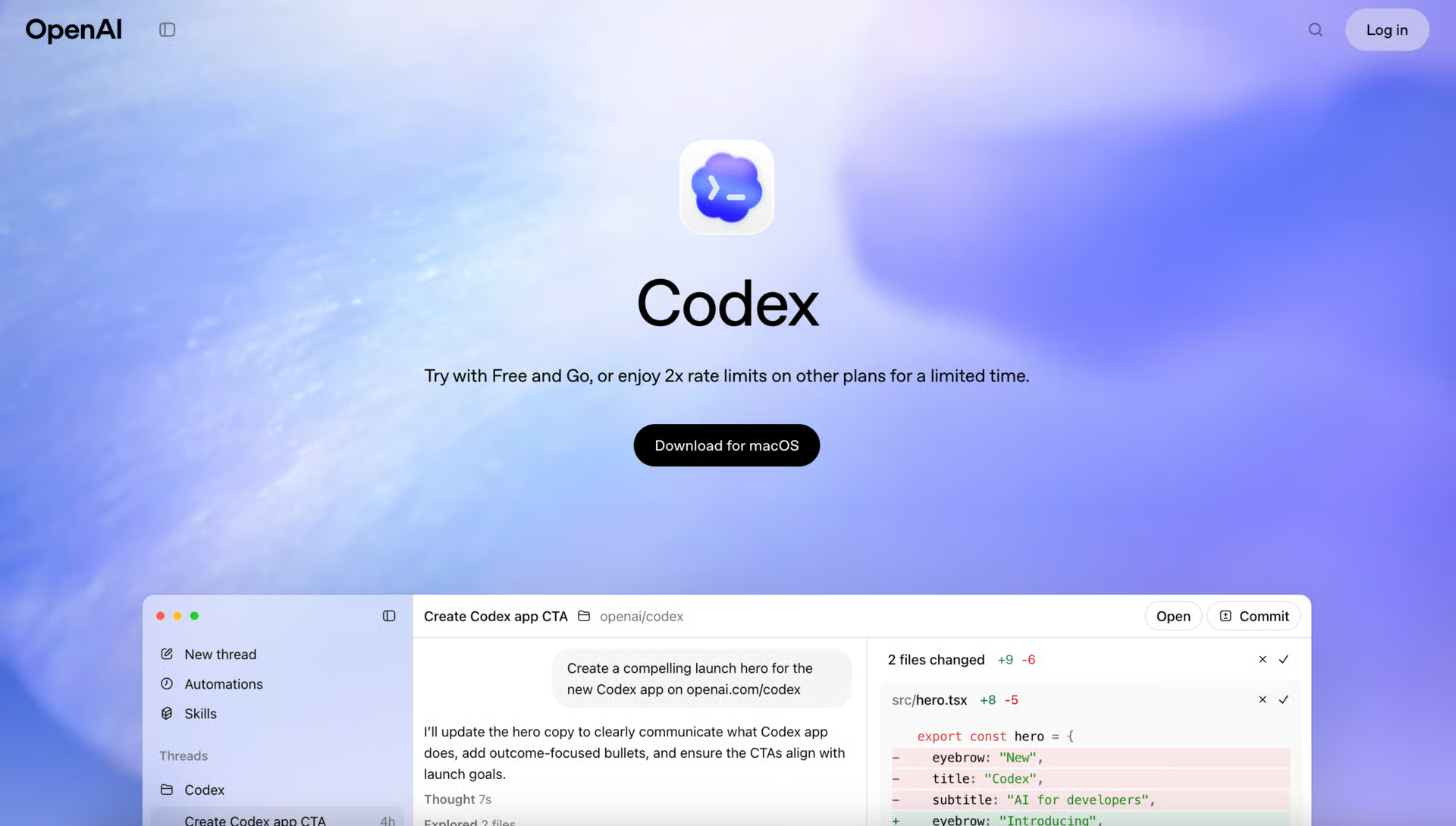
Built for Long-Running and Parallel Workflows
One of Codex Desktop’s most significant advantages over browser-based tools is its ability to support hours-long or days-long operations. A native macOS application can run alongside other development tools, preserve thread history, and maintain review panes without the interruptions or context loss that often plague web sessions.
This design nudges users toward orchestration and planning, rather than reactive prompting. As teams grow comfortable with this model, it becomes feasible to run agents overnight to tackle testing backlogs, documentation updates, or large-scale refactors. In this emerging market, the winners are likely to be those who make such workflows feel routine rather than experimental.
Skills, Automations, and Work Beyond Code
Codex Desktop also expands the scope of what AI agents can do through skills—a framework that allows agents to interact with external tools and workflows. Skills combine instructions, scripts, and utilities, enabling Codex to communicate with design platforms, deployment services, and project-management systems.
For example, agents can retrieve assets from Figma and convert them into production-ready UI code, deploy applications to platforms like Vercel or Netlify, or interact with issue trackers to triage bugs and manage releases. These capabilities turn Codex into a workflow engine, not just a coding assistant.
Complementing skills are automations, which allow users to set up recurring background actions. Codex can continuously run tasks such as automated testing, daily issue triage, or progress reporting, reducing the cognitive load on developers and freeing them from repetitive work.
Security, Control, and Enterprise Readiness
As agent autonomy increases, so do concerns around security, compliance, and privacy. OpenAI has addressed these risks by building Codex Desktop on a system-level sandboxing model, similar to the Codex CLI. By default, agents can only edit files within assigned directories and cannot perform actions requiring elevated permissions unless explicitly authorised.
Teams can define rules to automate permissions for trusted tasks, striking a balance between flexibility and control. This approach is particularly important for enterprises, where unchecked agent autonomy could introduce serious risks.
The broader business challenge remains unresolved across the industry: organisations must weigh the productivity gains of agentic AI against the need for governance. Too much freedom invites risk; too many restrictions blunt competitive advantage. Codex Desktop positions itself as a tool that acknowledges this tension rather than ignoring it.
Access, Pricing, and Platform Expansion
Codex Desktop is available immediately for macOS users. It is included across all ChatGPT subscription tiers—Plus, Pro, Business, Enterprise, and Edu—with expanded token limits for team plans. Users can also purchase additional usage credits as needed.
In a bid to accelerate adoption, OpenAI is offering temporary access to Codex for ChatGPT Free and Go users, allowing a wide range of individuals and teams to explore its capabilities without a lengthy procurement cycle.
Looking ahead, OpenAI has confirmed plans to bring Codex Desktop to Windows and to refine workflows based on real-world developer feedback. Future updates are expected to include autonomous cloud-based triggers and further improvements to multi-agent communication.
The Competitive Landscape Tightens
Codex Desktop enters a crowded and fast-moving field. Anthropic’s Claude Code remains a formidable rival, bolstered by strong enterprise features and the introduction of Claude Cowork, which targets non-technical users and line-of-business workflows. That strategy has raised expectations across the market.
However, reliance on cloud-based services carries risks. A recent brief outage affecting Claude models disrupted teams using Claude Code, underscoring the value of redundancy and local tooling. In this context, OpenAI’s desktop-first push looks particularly well timed.
Adding further pressure is Microsoft, OpenAI’s parent company, whose Copilot is deeply embedded across major IDEs and enterprise environments. With advanced chat, terminal support, agent modes, and an expanding “Workspace” concept, Copilot increasingly resembles an AI engineer embedded directly into daily work. For OpenAI, maintaining relevance in enterprise conversations requires visibility across similar surfaces.
A Turning Point for AI-Driven Development
Few observers believe AI coding tools are ready to replace human developers entirely. Yet their ability to accelerate work is no longer in doubt. As OpenAI CEO Sam Altman has noted, AI models “don’t run out of dopamine—they keep trying, they don’t lose motivation.” That persistence, combined with growing autonomy, is reshaping how software is built.
Codex Desktop represents a significant step in that evolution. By enabling multi-agent orchestration, deep tool integration, and intelligent automation within a secure framework, OpenAI is signalling its vision for the future of development: one where AI is not just an assistant, but a trusted collaborator embedded at every stage of complex projects.
As agentic AI rivalry intensifies, Codex Desktop is less about catching up and more about redefining how teams work alongside machines. Whether it succeeds will depend not only on model performance, but on how naturally it fits into the daily rhythms of developers and enterprises navigating an increasingly automated world.
With inputs from agencies
Image Source: Multiple agencies
© Copyright 2025. All Rights Reserved. Powered by Vygr Media.