

 By

WhatsApp Web has become an essential communication tool for millions of people, allowing users to access their chats, exchange files and respond to messages directly from their computers. From office employees and business owners to students and freelancers, people increasingly rely on the desktop version of WhatsApp to manage everyday communication.
However, this convenience comes with security risks that users should not overlook.
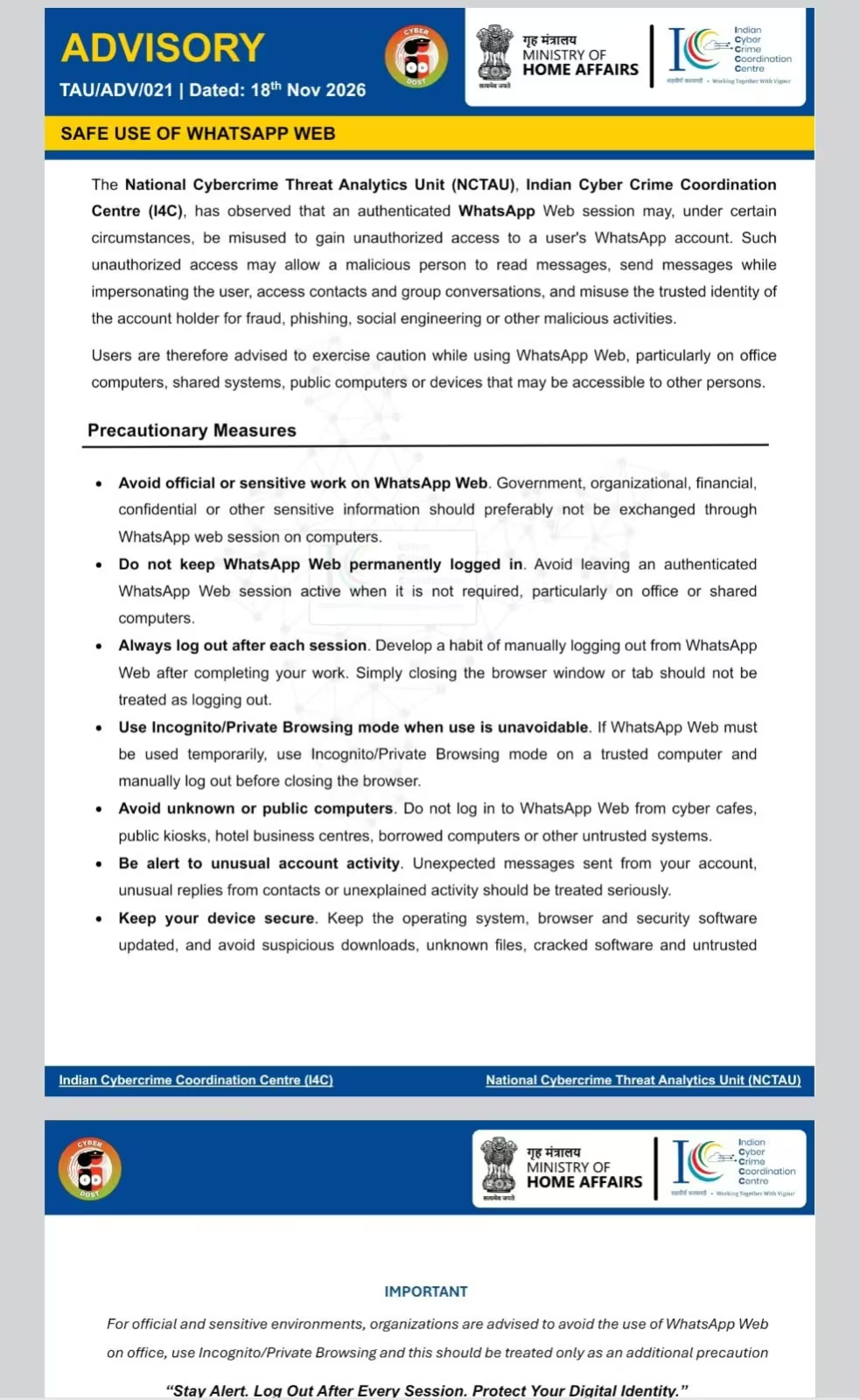
The Ministry of Home Affairs has issued an important WhatsApp Web security advisory, urging users to exercise caution while accessing their accounts through computers. The warning highlights how an active, authenticated WhatsApp Web session could potentially be misused to gain unauthorised access to someone's account, exposing private conversations, contacts and group chats.
The government has particularly cautioned against leaving WhatsApp Web accounts permanently logged in, using public or shared computers, and exchanging sensitive professional information through the platform.
The advisory serves as an important reminder that even a seemingly harmless habit, such as forgetting to log out of WhatsApp Web after finishing work, could create an opportunity for cybercriminals to misuse a personal account.

What Is the Government's WhatsApp Web Security Advisory About?
The latest warning has been issued by the Indian Cyber Crime Coordination Centre (I4C), operating under the Ministry of Home Affairs. Its National Cybercrime Threat Analytics Unit (NCTAU) has identified the possibility of authenticated WhatsApp Web sessions being exploited to gain unauthorised access to users' accounts.
According to the advisory, an active WhatsApp Web session may allow malicious individuals to access an account under certain circumstances. This could happen when users leave their accounts logged in on computers that other people can access or when they use devices that do not have adequate security protections.
Once an unauthorised person gains access, the consequences could extend beyond simply reading private messages.
They may be able to:
-
Read personal and professional conversations.
-
Send messages while impersonating the account owner.
-
Access contact lists and group conversations.
-
Exploit the account holder's trusted identity to deceive other people.
-
Attempt fraud, phishing attacks and social engineering scams.
The concern is particularly significant because WhatsApp is widely used for personal communication, business coordination and sharing important documents. A compromised account could therefore put not only the account holder but also their contacts and professional network at risk.
Why Leaving WhatsApp Web Logged In Can Be Risky
One of the most important recommendations in the government advisory is to avoid keeping WhatsApp Web permanently logged in.
WhatsApp Web allows users to connect their mobile accounts to a computer through a linked-device session. Once authenticated, users can exchange messages and access conversations through the browser without repeatedly scanning a QR code.
While this makes communication convenient, it also means that an unattended, still-authenticated session can become a security concern.
For instance, imagine logging into WhatsApp Web on an office computer to respond to messages during working hours. After finishing your work, you close the browser or walk away without logging out.
If that session remains active and another person gains access to the computer, they may potentially be able to open your WhatsApp conversations.
The risk becomes greater when users access their accounts through shared systems, borrowed laptops, public computers or devices with weak security controls.
Importantly, simply closing a browser window should not be treated as a substitute for manually ending the WhatsApp Web session.
The government has therefore recommended logging out manually after every session instead of leaving accounts continuously connected.
Why the Government Is Advising Users Against Sharing Sensitive Office Data
Another major concern highlighted in the advisory is the use of WhatsApp Web for official and confidential communication.
Many employees use WhatsApp to exchange work-related documents, discuss projects, coordinate with colleagues and share business information. While this may appear convenient, using personal messaging accounts through computer browsers can introduce additional security and privacy risks.
The government has recommended that users avoid exchanging the following types of information through WhatsApp Web sessions on computers:
-
Government-related documents and information.
-
Confidential organisational data.
-
Financial records and sensitive banking information.
-
Internal business communications.
-
Private company documents and other sensitive information.
The concern is not limited to individual privacy. If an employee's WhatsApp account is compromised, attackers could potentially exploit professional conversations and trusted contacts to conduct impersonation scams.
For example, a cybercriminal could send a message to a colleague pretending to be the employee and request confidential documents or an urgent financial transfer. Since the message originates from a familiar account, the recipient may be less likely to question its authenticity.
This makes WhatsApp Web security particularly important for businesses, corporate employees, government departments and organisations that regularly handle sensitive information.
Companies should therefore establish clear communication policies and encourage employees to use authorised, secure channels for sharing confidential information.
How to Use WhatsApp Web Safely: 7 Important Security Precautions
The government advisory outlines several precautions that can help users minimise the risk of unauthorised account access.
Here are seven important WhatsApp Web security practices everyone should follow.
1. Always Log Out After Every Session
The most important precaution is to manually log out of WhatsApp Web after completing your work.
Do not assume that closing the browser window or tab automatically terminates your authenticated session. Make logging out a regular habit, particularly when using office computers or shared devices.
2. Avoid Using WhatsApp Web on Public Computers
Avoid accessing WhatsApp Web through cyber cafes, public kiosks, hotel business centres and borrowed computers.
Such systems may be accessible to multiple people, and users generally have limited control over their security settings, installed applications and browser configurations.
If you cannot establish whether a computer is trustworthy, it is better not to connect your WhatsApp account to it.
3. Use Incognito or Private Browsing When Necessary
If accessing WhatsApp Web is unavoidable, the advisory recommends using Incognito Mode or Private Browsing on a trusted computer.
Private browsing can help reduce the retention of certain browsing data after a session ends. However, it is not a complete security solution and does not automatically protect an active WhatsApp session.
Always manually log out before closing the private browsing window.
4. Never Exchange Confidential Information Through Untrusted Systems
Avoid sharing sensitive office documents, financial information, government records or confidential organisational data through WhatsApp Web on computers.
For professional communication, prioritise company-approved platforms and secure file-sharing solutions.
5. Monitor Your WhatsApp Account for Suspicious Activity
Keep an eye on unusual account behaviour.
Unexpected messages sent from your account, unfamiliar replies from contacts or conversations you do not remember having could indicate possible unauthorised access.
Do not ignore these warning signs. Investigate suspicious activity and review your linked devices.
6. Keep Your Browser and Security Software Updated
Outdated browsers, operating systems and security applications may expose computers to vulnerabilities.
Install security updates regularly and ensure your antivirus or other security software remains updated.
Avoid downloading unknown files, opening suspicious attachments or installing cracked software from untrusted sources.
7. Never Leave an Authenticated Session Unattended
Even when using your personal or office computer, avoid leaving WhatsApp Web open when stepping away from your desk.
Lock your computer whenever it is unattended, particularly in shared workplaces. Better still, log out of WhatsApp Web whenever you finish using it.
These simple habits can significantly reduce opportunities for others to access your account without permission.
How to Check and Log Out of Linked WhatsApp Web Devices
Users who frequently access WhatsApp Web should periodically review the devices connected to their accounts.
If you suspect that you have forgotten to log out of a computer or have accessed WhatsApp Web on an unfamiliar device, you can check your linked devices through the mobile application.
Follow these steps:
-
Open WhatsApp on your smartphone.
-
On Android, tap the three-dot menu and select Linked Devices. On iPhone, open Settings and select Linked Devices.
-
Review the list of connected devices and their last active information.
-
Select any unfamiliar device or computer you no longer use.
-
Tap Log Out to disconnect that device.
If you recognise a device that you no longer have access to, remotely logging out can help prevent someone from using that linked session.
It is a good idea to review this section periodically rather than waiting until you notice suspicious activity.
Does the Government Advisory Mean WhatsApp Web Is Unsafe?
The advisory should not be interpreted as a declaration that WhatsApp Web is inherently unsafe or that every active session has been compromised.
Instead, it highlights the potential misuse of authenticated sessions, particularly when accounts remain logged in on computers that other people can access.
The distinction is important.
WhatsApp Web offers convenience by allowing users to access their conversations through a computer. However, account security also depends on how responsibly users manage their linked devices, browser sessions and computer access.
Using a trusted personal computer, keeping software updated, avoiding suspicious downloads and manually logging out after every session are important protective measures.
Similarly, Incognito Mode should not be mistaken for a complete cybersecurity solution. It provides additional privacy for browsing activity but cannot replace proper account security practices.
The government's message is therefore less about avoiding technology altogether and more about developing safer digital habits.
What the WhatsApp Web Warning Means for Businesses and Office Employees
The latest cybersecurity advisory also carries an important message for organisations that rely heavily on instant messaging.
In many workplaces, employees use WhatsApp Web to communicate with colleagues, clients, vendors and business partners. However, using personal messaging accounts on shared office computers can create security challenges.
A compromised account could potentially expose business conversations, contact information and sensitive communications. Attackers may also exploit the trust between colleagues to circulate phishing links, request money or obtain confidential documents.
Businesses should consider implementing clear cybersecurity guidelines covering:
-
The use of personal messaging applications on office computers.
-
Approved platforms for sharing confidential business information.
-
Secure document-sharing and collaboration practices.
-
Regular software and browser updates.
-
Employee awareness of phishing and impersonation attacks.
-
Procedures for reporting suspicious account activity.
Employees should also understand that convenience should never take priority over information security.
A few seconds spent logging out of WhatsApp Web can help prevent unnecessary exposure of personal and professional conversations.
Final Takeaway: Log Out, Stay Alert and Protect Your Digital Identity
The latest WhatsApp Web security advisory from the Ministry of Home Affairs is a timely reminder that everyday digital habits can have serious cybersecurity implications.
Leaving an account permanently logged in, accessing WhatsApp Web through public computers or exchanging sensitive office information through untrusted systems can create opportunities for unauthorised access and account misuse.
Users should make it a habit to manually log out after every session, avoid unfamiliar computers, use private browsing when necessary on trusted systems and regularly review their linked devices.
Businesses and employees should be equally cautious about sharing confidential information through personal messaging platforms.
As cybercrime and online impersonation become growing concerns, protecting your digital identity requires more than strong passwords. It also demands awareness, responsible device management and consistent security practices.
Remember: Stay alert, log out after every session and never compromise your digital security for convenience.
© Copyright 2026. All Rights Reserved. Powered by Vygr Media.